How to Make Muscles Pop in a Photo
Published · Updated
Quick answer
To make muscles pop in a photo, use angled light instead of flat light, turn your torso slightly, and time your flex for just before the shutter. Finish with natural editing that keeps added definition inside a believable limit.
Key takeaways
- Angled light creates the shadow that makes muscle look defined; flat light washes it out.
- Turn your torso slightly and flex just before the shutter, not through the whole shoot.
- A light sheen on skin reflects highlights that sharpen muscle separation.
- Chisel's natural limit keeps edited definition believable instead of pasted-on.
- Manual edits run on your phone; AI Transform sends the photo to a cloud provider and asks first.
Here's how to make muscles pop in a photo: shadow does more work than muscle does, so angled light, a slight body turn, and a flex timed right before the shutter matter most. The rest comes down to skin prep and, if needed, natural editing that sharpens what the light already suggests.
What actually makes muscle pop in a photo?
Getting muscle definition in photos is mostly an illusion of light and shadow. A lean, well-defined physique can still look flat and smooth under flat lighting, while a slightly softer build can look sharper under the right conditions. The camera doesn't see muscle — it sees contrast between light and dark areas, and that contrast is what reads as separation between muscle groups.
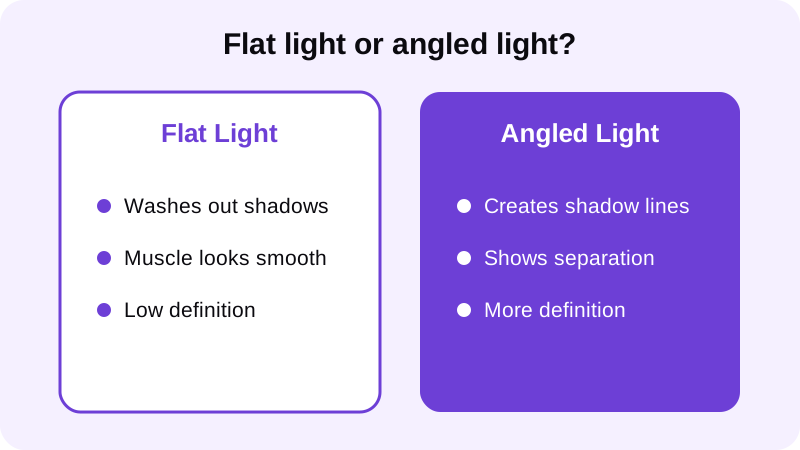
That's why the same person can look completely different in two photos taken minutes apart. Light direction, pose, and a little skin prep change the result far more than the physique itself does. For a deeper look at setting up that light source, see our guide on best lighting for gym progress photos.
How do you pose and light a photo so muscle definition shows?
Once you understand that shadow sells definition, the setup becomes straightforward. The goal is a light source to the side of your body instead of straight on, and a pose that creates natural lines rather than a flat, square-on stance.
- Move your main light source to the side of your body instead of directly in front — a window, a lamp, or an angled gym light all work.
- Turn your torso slightly away from the camera rather than facing it dead-on; a quarter turn shows more shape than a flat front pose.
- Relax between shots, then flex for only a second or two right before the photo is taken, so the muscle looks engaged instead of strained.
- Lower the camera slightly below chest height and shoot a little upward — this adds a subtle sense of size without distorting the frame.
- Check your skin under the light; a light sheen reflects highlights that sharpen the lines between muscle groups, while overly dry or oily skin reads flat or blown out.
Posture does a lot of the work too. Rounded shoulders and a forward head hide the chest and shoulder lines that make muscle pop. If your stance tends to collapse in photos, our guide on how to correct posture in a photo covers simple stance adjustments that open up the torso.
How do you use editing to make muscle pop without looking fake?
Lighting and pose get you most of the way there, but a photo taken under gym lighting at an awkward angle doesn't always cooperate. That's where a natural muscle edit helps — not by changing your body, but by sharpening what the light and pose already suggest.
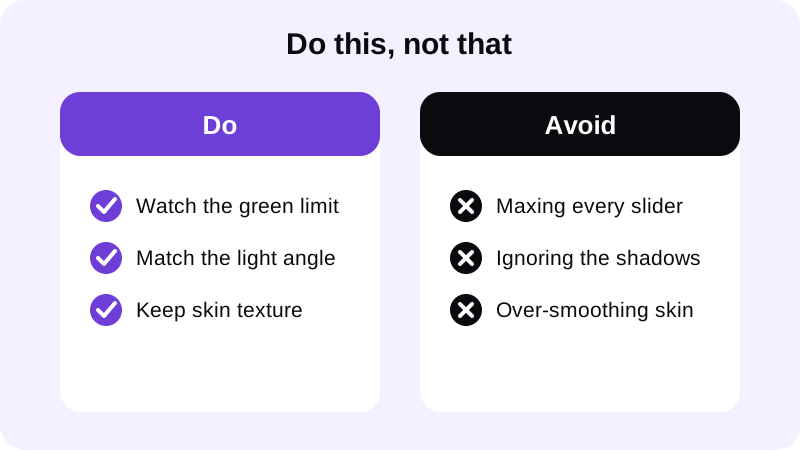
Chisel's pose detection finds your torso automatically in a shirtless photo or a fitted top, no manual masking needed. From there you can add chest, arm, and shoulder volume and build a V-taper, or sharpen ab definition where the lighting already hints at it. Every slider shows a natural limit marked in green, so the added definition stays inside a range that still looks like your actual photo, not an inflated version of it. For the full breakdown of that process, see how to add muscle to a photo that looks real.
A slightly slimmer waist also makes shoulder and chest definition read more clearly, since the contrast between a narrower waist and a broader upper body is part of what makes muscle pop in the first place.
Chisel's manual editing tools, including the sliders above, run on your phone. If you use the optional AI Transform feature instead, your photo is sent to a third-party cloud AI provider to generate the result, and the app asks first before it does. Either way, Chisel writes an AI-altered label into the edited photo's metadata, so the edit is disclosed rather than hidden. Every editing tool in the app is free to use; the Pro tier removes ads and the watermark and unlocks Pro templates, and it includes a short free trial if you want to try it before deciding. Photos export in HD, and anything larger than 2048 pixels on the long side gets scaled down when you import it. For more on how the app is built, see Chisel AI: what it is and how it works.
What mistakes make muscle look flat in a photo?
A handful of habits quietly cancel out everything above. Watch for these before you blame the lighting or the photo itself.
- Standing dead square to the camera. A completely flat, front-on pose compresses the body and hides the side shadows that create shape.
- Overexposing the shot. Bright, blown-out highlights erase the shadow detail that gives muscle its edges — check exposure before you shoot, not after.
- Flexing too early or too long. Holding a flex for a full set of photos usually looks tense and unnatural by the last few frames.
- Pushing every editing slider to the max. Definition that exceeds the natural limit looks pasted on rather than like real shadow and muscle.
If your base photo already has decent lighting and a good angle, editing just needs to finish the job, not do all the work. For more on getting that base photo right before you open any editor, see our guide on how to look more muscular in photos.
Where else can you learn to edit a gym photo naturally?
FAQ
What's the fastest way to make muscles pop in a photo without editing?
Move your main light source to the side of your body, turn your torso slightly away from the camera, and flex for only a second or two right before the shot. Angled light creates the shadow lines that read as muscle separation, which does more than pose or physique alone.
Does flexing longer make muscle definition show up better?
No. Holding a flex through an entire shoot tends to tighten the face and neck and looks strained by the last few frames. Flex for a second or two right before the shutter, then relax, so the muscle looks engaged rather than forced.
Can editing fix a photo with flat, front-on lighting?
Editing helps more when the base photo already has some shadow to work with. Adding heavy definition to a flat, front-on photo often looks pasted on because the edited shadows don't match the original lighting direction. Reshoot with angled light first if you can.
Is Chisel's editing private?
Chisel's manual sliders run on your phone. The optional AI Transform feature sends your photo to a third-party cloud AI provider to generate the result, and it asks first. Either way, Chisel writes an AI-altered label into the photo's metadata.
Do I need Chisel Pro to add muscle definition?
No. Every editing tool in Chisel, including the muscle, ab, and jawline sliders, is free to use. Pro removes ads and the watermark and unlocks Pro templates, and it includes a short free trial if you want to try it.