How to Fix Posture in a Photo (Pose, Angle, Edit)
Quick answer
To fix posture in a photo, correct your stance, chin level and camera angle while shooting — editing can only clean up small details afterward, not rebuild a slouched pose from scratch.
Key takeaways
- Posture is mostly fixed by how you stand, not by editing after the shot
- Chin level and shoulder position matter more than any slider
- Camera angle and height change how straight your posture reads
- Chisel can sharpen the jawline and tidy the waist, not reshape the spine
- Keep edits inside the green natural limit so they still look like you
To fix posture in a photo, the real work happens before you press the shutter — stance, chin position and camera angle decide more than ninety percent of how straight you look. Editing can only clean up the small details a good pose leaves behind.
Why does posture look worse in photos than in person?
A camera flattens depth, so a slight slouch that nobody notices in the mirror reads as a full hunch on screen. Phones held low make it worse — shooting up at a chin tucked forward exaggerates rounded shoulders and shortens the neck in the frame.
Lighting adds to it. A single harsh light from above casts a shadow under the chin and collarbone that reads as "collapsed" posture even on a straight-standing subject. None of this is about your actual stance — it's about what the lens and light are doing to it.
Distance plays a part too. Standing too close to the camera widens whatever is nearest the lens — usually the shoulder or hip closest to it — and that uneven widening can look a lot like a twisted, slouched stance even when your spine is perfectly straight. Stepping back a pace or two and zooming in slightly instead flattens that distortion out.
How do you stand for a straighter-looking posture before you shoot?
Fixing posture in a photo starts with a short setup routine, not an app. Run through this before every shot.
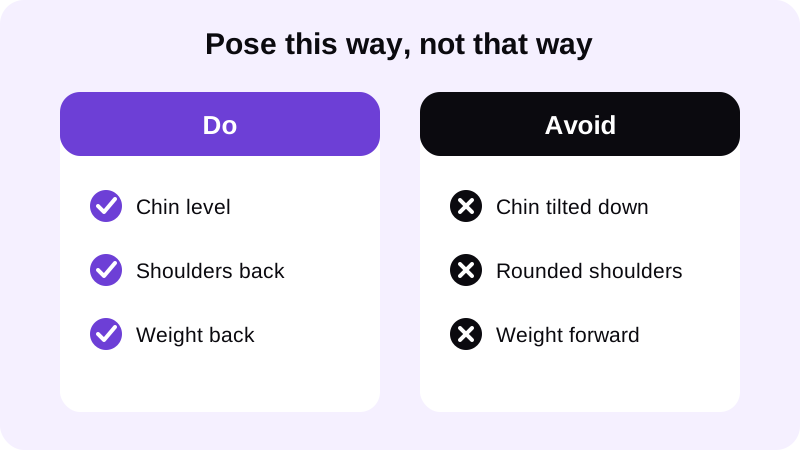
- Set the camera at chest height, not down near your waist or phone propped on the floor.
- Level your chin so it's parallel to the floor — not tucked down, not lifted.
- Roll your shoulders back and let them drop, instead of pulling them up toward your ears.
- Shift your weight slightly onto your back leg so your chest opens toward the camera.
- Take a breath in right before the shot — a filled chest reads straighter than a relaxed exhale.
- Check the frame before you commit — a quick glance at the preview catches a tilted stance instantly.
None of these adjustments need to feel exaggerated. The goal is a stance that's slightly more upright than feels natural, because the camera tends to flatten posture back toward neutral. Practising the sequence a few times in a mirror before the actual shot makes it feel automatic instead of stiff.
Can you fix posture after the photo is already taken?
Only partly. Editing can sharpen a jawline, add definition or tidy a waistline, but it can't rebuild the angle of a slouched spine without the photo looking warped. The earlier you catch posture — pose, then camera, then light — the less there is left to fix afterward.
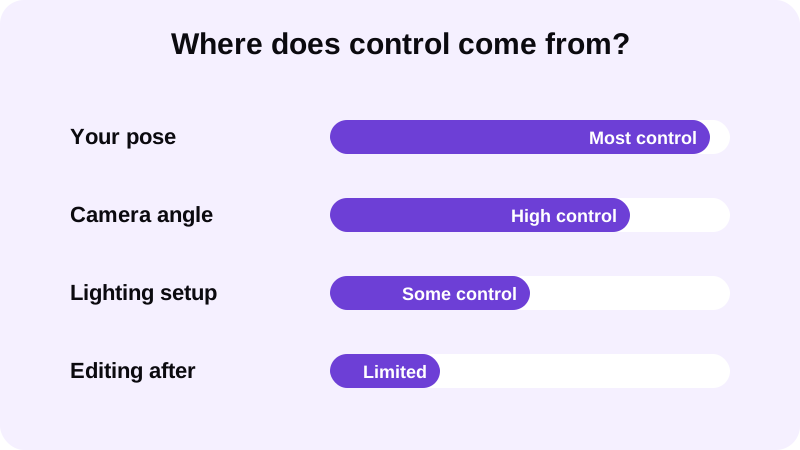
This is where an app like Chisel is useful for the parts posture doesn't touch. It can sharpen the jawline, add six-pack definition, build out shoulder and chest volume, and slim the waist — all within a natural limit marked in green, so the edit still looks like you rather than a reshaped stranger. Pose detection finds your torso automatically, with no manual masking, and all of it runs on-device so the photo never leaves your phone.
It's worth being clear about what that kind of edit is actually doing. It isn't straightening a spine or rotating shoulders — it's refining the shape and shadow of muscle and jawline that your pose already set up. A photo with genuinely poor posture won't be rescued by those tools; a photo with decent posture and slightly soft definition is exactly what they're built for.
If the goal is better shoulder width to counter a narrower-looking stance, the guide on how to widen shoulders in a photo covers that specific adjustment. If the issue is more about a soft midsection pulling your stance forward in photos, see how to hide belly fat in photos.
What's the most common posture mistake people try to fix wrong?
The biggest mistake is reaching for a generic warp or liquify tool to "straighten" a slouch after the fact. Pushing pixels to bend a spine almost always distorts the background, the doorframe behind you, or the proportions of the arm nearest the edit — and it's one of the easiest edits for anyone to spot.
The second most common mistake is cropping too tight around the shoulders to hide rounding, which usually just makes the frame feel cramped and draws more attention to the area you were trying to fix. Stepping back half a pace and reshooting with the chin-level, shoulders-back checklist above almost always beats any crop or warp.
A third, quieter mistake is treating every photo in a batch the same way. A stance that reads fine from one angle can look rounded from another, so it's worth checking each shot on its own rather than applying one fix across the whole set. Reshooting one bad angle takes less effort than trying to patch it afterward.
How do you make the final edit still look natural?
Once the pose and angle are right, keep edits small and proportional. A sharper jawline pairs well with squared shoulders; added waist taper pairs well with a chest that's already open toward the camera. Chisel's core tools are free to use, Pro removes ads and the watermark with a short free trial, and a one-time Lifetime option exists if you'd rather skip the subscription. Every edited photo also gets an AI-altered label written into its metadata, so there's never a question about what was changed.
Export in full resolution once you're happy with it, or use the animated before/after reveal if you want to share the comparison — it's a sharing format, not a promise about what any photo will look like. For more on how the app's sliders and limits work together, see what Chisel is and how it works.
Where else can you learn to edit a gym photo naturally?
- How to take a good shirtless photo
- Best lighting for gym progress photos
- Body editor for men: edit gym photos without looking fake
FAQ
Can Chisel fix slouching in a photo?
Chisel can't restructure how your spine or shoulders are angled in a photo — that's a posing problem, not an editing one. It can sharpen the jawline, add definition and slim the waist within a natural limit, which often makes an already-decent pose read cleaner.
What camera angle makes posture look straighter?
A camera held at chest height, shooting straight on or very slightly upward, reads straighter than a phone propped low on the floor. A low angle exaggerates any forward head tilt or rounded shoulders, even when your actual stance is fine.
Does posture affect how muscle definition looks in a photo?
Yes. Rounded shoulders and a forward head shorten the torso and hide the V-taper, so chest and shoulder definition read smaller than they are. Standing taller before the shot does more for that look than any editing tool.
Will fixing posture after the fact look obviously edited?
Trying to force a slouched photo straight with aggressive edits usually looks warped or stiff. It's more natural to accept the pose you have, make small balanced adjustments inside the natural limit, and get the stance right in the next shot.