How to Hide Belly Fat in Photos (Naturally)
Published · Updated
Quick answer
To hide belly fat in photos, turn a quarter away from the camera, stand tall, use soft front lighting, wear fitted clothing, and finish with a waist-slimming edit kept inside Chisel's natural limit so it still looks like your real body.
Key takeaways
- Turn a quarter away from the camera and stand tall instead of shooting straight on.
- Soft, front-angled light removes the shadow pockets that make a stomach look heavier.
- Fitted clothing skims the body; loose shirts bunch up and cast extra shadow.
- Chisel's waist tool has a green natural limit so the edit still matches the rest of the photo.
- Chisel's manual tools run on your phone; AI Transform uses a cloud provider and asks first.
If you want to know how to hide belly fat in photos, start with your angle and lighting before you touch any editing tool. Finish with a waist-slimming edit that stays inside a natural limit so the result doesn't look obvious.
What angle hides belly fat best?
A straight-on shot facing the camera is the worst angle for a midsection. It flattens your body into two dimensions and puts your stomach right in the center of the frame.
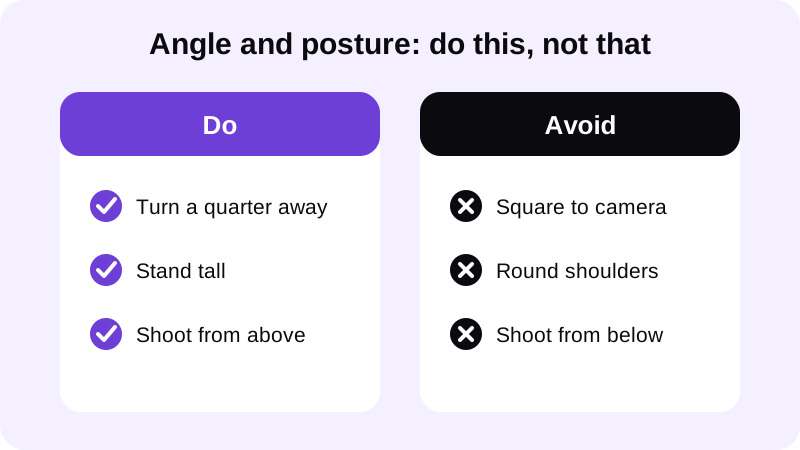
Turn your body about a quarter turn away from the camera instead. This gives your torso a natural taper and puts your side, not your front, toward the lens.
Standing tall matters more than people think. Rounded shoulders and a forward-leaning posture compress the stomach and push it out. Pull your shoulders back, lengthen your spine, and shoot from slightly above eye level rather than below it. A camera angled down at you elongates the torso instead of compressing it. If posture is a recurring issue in your photos, the full breakdown is in How to Correct Posture in a Photo.
How does lighting change how belly fat looks in a photo?
Shadows are what make a stomach look heavier than it is in person. A single harsh light source, especially overhead or from directly below, creates dark pockets around the midsection that draw the eye.
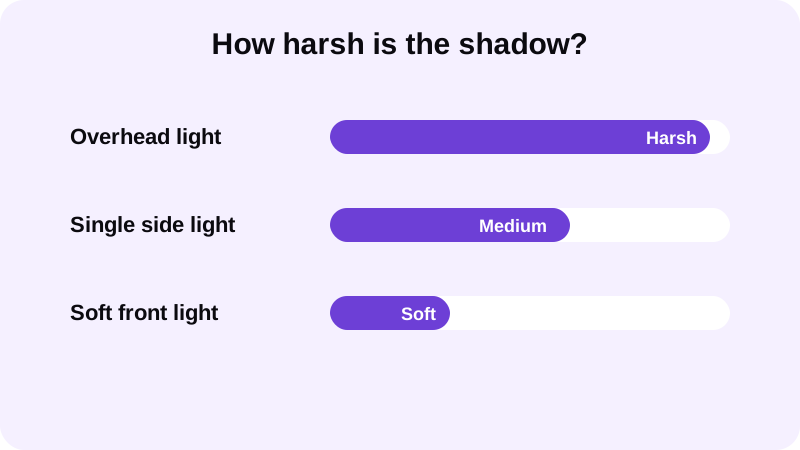
Soft, even light from the front or a slight angle removes most of that shadow and flattens the visual weight of the stomach. If you're shooting in a gym, avoid standing directly under a single ceiling light. Move toward a spot with more even ambient light, or angle yourself so the light source hits you from the front-side rather than straight above. For a deeper breakdown of setups that work well for physique photos, see Best Lighting for Gym Progress Photos.
What clothing choices make a stomach look flatter in photos?
Fitted clothing, counterintuitively, often looks better than loose clothing. Baggy shirts bunch up and create shadows and shapes that can look worse than the stomach itself.
A well-fitted top skims the body without clinging in a way that highlights every contour. If you're going shirtless, a slight forward lean at the hips combined with a tightened core in the pose can visibly change the line of the stomach, without any editing involved. This is one of the most reliable ways to flatten a stomach in photos before you ever open an editor — see How to Take a Good Shirtless Photo for the full setup.
How do you edit a photo to hide belly fat without it looking fake?
Once the pose and lighting are as good as they'll get, editing can clean up the rest. The mistake most people make is pushing a slimming tool too far.
- Start with a photo where your torso is visible — a shirtless photo or a fitted top both work with Chisel's pose detection, which finds your torso automatically with no manual masking.
- Apply the waist-slimming tool gradually, watching the green natural-limit marker rather than dragging straight to the maximum.
- Balance the edit with the rest of the frame — a slight shoulder widening to match, covered in how to add muscle to a photo that looks real, helps the whole torso read as consistent.
- Leave skin texture alone. Chisel's Smooth filter smooths the whole photo rather than one spot, so smoothing only the stomach while the rest of the image keeps its natural texture is not what it's built for — and that mismatch is one of the easiest edits to spot.
- Export the result. Chisel exports edited photos in HD; photos larger than 2048 px on the long side are scaled down when you import them, so start from a clean, sharp source photo.
Should you combine waist slimming with other edits?
A slimmer waist on its own can look inconsistent if nothing else in the photo changes. Many people pair a subtle waist adjustment with a small amount of ab definition, covered in how to add a six-pack to a photo.
Even a modest amount of definition, kept within the natural limit, gives the midsection a shape that matches a slimmer waistline instead of looking like an isolated tweak. Posture and expression changes read the same way above the neck. A relaxed jaw, chin slightly forward and down, and even frontal light reduce shadow under the chin the same way good light reduces shadow around the stomach — see How to Get a Sharper Jawline in Photos for that posing and lighting breakdown. Chisel doesn't edit the face; its sliders work on the body, so a sharper-looking jaw next to a flatter stomach is a matter of technique in front of the camera, not an extra tool in the app.
The goal across all of these tools is the same: small, proportional changes that stay inside a believable range. Chisel's pose detection finds your torso automatically — no manual masking — so you can test a waist edit on a shirtless photo or a fitted-top photo without any extra setup.
Is it safe to edit a photo like this?
Chisel's manual editing tools, including the waist slider, run on your phone, and every tool in the app is free to use. There's no account required to use it.
The app also offers an optional AI Transform feature, which sends your photo to a third-party cloud AI provider to generate its result — and it asks first before doing so. When you export an edited photo, Chisel writes an AI-altered label into the image's metadata, so the edit is disclosed rather than hidden. For more on how the app is put together, see Chisel AI: What It Is and How It Works.
FAQ
Does camera angle really change how belly fat looks in a photo?
Yes. A straight-on shot compresses your torso into one flat plane and centers your stomach in the frame. Turning a quarter away and shooting from slightly above eye level gives your midsection a natural taper and removes most of the visual weight, before you touch any editing tool.
What's the best lighting setup to hide a stomach in a photo?
Soft, even light from the front or a slight front angle casts the least shadow around the midsection. A single harsh overhead or underneath light source is the worst option, since it digs dark pockets into the stomach area that draw the eye straight to it.
Can editing alone fix a photo that was shot badly?
Editing helps, but it works best as the last step, not the first. A waist-slimming edit pushed hard on a photo with poor angle and harsh lighting will look mismatched. Get the pose and light right first, then use the editing tool for a smaller, more believable adjustment.
Is it safe to use an AI editor like Chisel on a gym photo?
Chisel's manual tools, including waist slimming, run on your phone, and every tool is free to use. The optional AI Transform sends your photo to a third-party cloud provider to generate its result and asks first. No account is required, and edited exports carry an AI-altered label in the metadata.
Does Chisel edit the face to make a photo look better overall?
No. Chisel has no jawline, eye, teeth or beard edits. Its sliders work on the body — abs, muscle, the V-taper and the waist. For the face, posing, angle, lighting and grooming do the work; Chisel's Smooth filter smooths the whole photo rather than retouching skin on its own.