How to Look More Muscular in Photos
Published · Updated
Quick answer
Here's how to look more muscular in photos: angle your body, raise the camera and light from the side to create shadow and shape, then use Chisel's Shoulders and Waist sliders for a V-taper and the optional AI Transform for muscle definition.
Key takeaways
- Angle your torso and raise the camera to show shape instead of a flat silhouette.
- Side or top lighting creates the shadow that makes muscle definition visible.
- Chisel's Shoulders and Waist sliders build a V-taper inside a natural limit.
- Six-pack and chest, shoulder and arm definition come from the optional AI Transform, not sliders.
- Small, proportional edits look real; maxed-out sliders don't.
Here's how to look more muscular in photos: fix your pose, angle and lighting first, then use Chisel's V-taper sliders and optional AI Transform to finish the shot. Get the basics wrong and no edit will save it; get them right and a small, natural edit does the rest.
What actually makes a photo look more muscular?
Three things make a photo look more muscular: shape, shadow and proportion. A physique reads as muscular when the camera shows separation between muscle groups, when light creates contrast along those lines, and when shoulders, chest and waist sit in a believable ratio to each other.
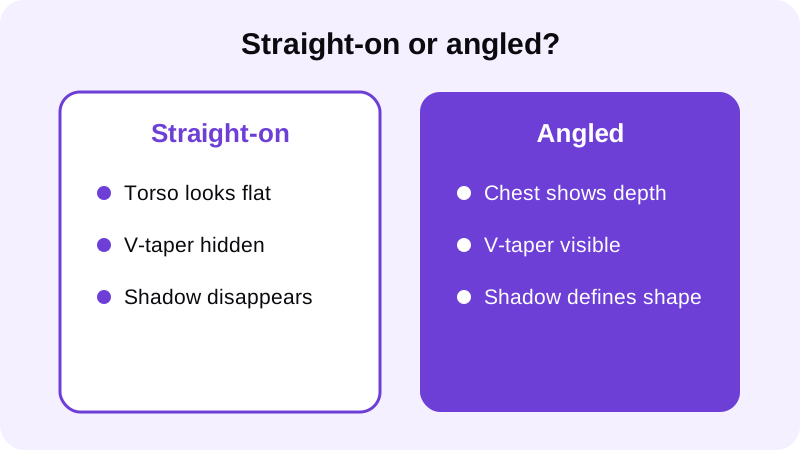
Miss any one of these and the photo looks flat, no matter how much muscle is actually there. This is also why the same body can look completely different in two photos taken minutes apart — the person didn't change, the angle, light and pose did. A slimmer waist next to broader shoulders reads as more muscular even without any added size, which is why posture and camera angle affect the result as much as the physique itself does.
How should you pose and shoot for a more muscular look?
Most of the work happens before you ever open an editor. Run through these steps in order.
- Angle the camera instead of shooting flat-on. Turning slightly lets the lens see depth in your chest and shoulders instead of compressing your torso into one flat plane.
- Raise the camera above waist height. A low angle exaggerates the stomach and shortens the torso; a camera at chest height or slightly above elongates the frame.
- Light from the side or above, not straight on. Flat front light — a phone flash or overhead fluorescent — erases the shadow that makes muscle definition visible.
- Hold a slight flex, not a maximum contraction. A fully relaxed pose looks soft and a straining max flex looks stiff; a held contraction with shoulders back and arms slightly away from the body looks natural.
- Wear a fitted top or go shirtless. Loose clothing hides the shape the camera is trying to capture in the first place.
None of this requires special gear — a window, a plain wall and a few minutes are enough to set up each shot. Once you're ready to edit, Chisel's pose detection finds your torso automatically, whether you're shirtless or in a fitted top, so there's no manual masking to do.
How do you finish the photo with editing tools?
Once the pose and lighting are doing their job, editing should refine what's already there, not manufacture something that isn't. Chisel's manual sliders don't draw ab lines or muscle definition on their own — they shift the proportions the camera already captured.
Build the V-taper. Chisel's Shoulders slider widens the body at shoulder height, and the Waist slider slims it at the waist. Together they build the classic V-taper — wider up top, tighter at the waist — which is one of the biggest levers for looking more muscular in a photo, and each one stops at a natural limit marked in green so the result still looks like you. See how to widen shoulders in a photo.
Add six-pack and muscle definition. Chisel's Abs and Muscle sliders both add the same gentle fullness to the middle of the torso — they don't draw ab lines or sculpt muscle shape by themselves. For visible six-pack lines and chest, shoulder and arm definition, use the optional AI Transform instead. It asks first, sends that one photo to a cloud AI provider, aims to keep your face, pose and background unchanged, and includes a limited number of free uses. Read more in how to add muscle to a photo that looks real and how to add a six-pack to a photo without looking fake.
Leave the face alone. Chisel doesn't edit the face — there's no jawline, eye, teeth or beard tool in the app. A sharper jaw or cleaner grooming in a photo comes down to pose, angle, light and grooming, not a slider; see how to get a sharper jawline in photos naturally for that side of it.
If the photo has visible grain or uneven texture from low light, Chisel's Smooth filter smooths the whole image — it's a general pass on the photo, not a face or skin retouch, so use it sparingly if you want the shape and shadow underneath to stay visible.
What's the most common mistake people make?
Overcorrecting. If the pose and lighting were weak, people try to fix everything in editing — pushing every slider toward its limit to compensate for a shot that never showed much shape to begin with.
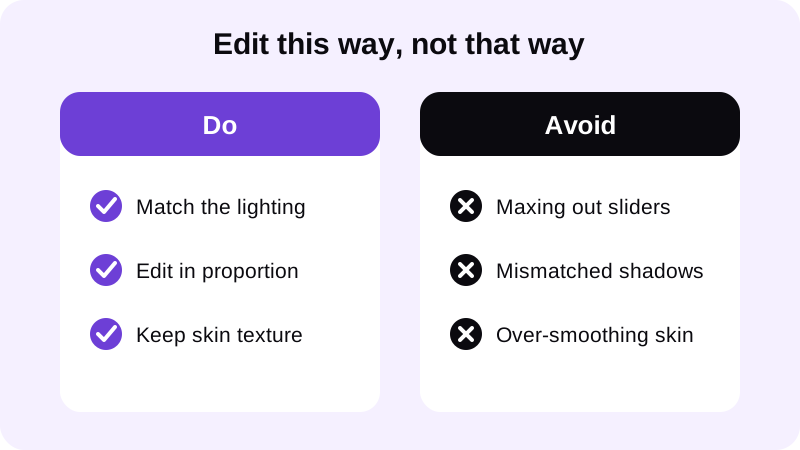
A chest that looks heavier than the shoulders holding it, or a V-taper that doesn't match the lighting on the rest of the body, both signal an edit before anyone reads the caption. The fix is sequencing: get the shot as good as you can first, then use editing for the last stretch — refining what's already visible instead of inventing what isn't.
How does Chisel handle this without it feeling like a gimmick?
Chisel's manual editing tools — the Shoulders, Waist, Abs and Muscle sliders — run right on your phone. If you use the optional AI Transform instead, your photo is sent to a third-party cloud AI provider to generate the six-pack and muscle definition, and the app asks first before it does that.
Every editing tool in the app is free to use, including the Shoulders and Waist sliders that build the V-taper. Chisel Pro removes ads and the watermark and unlocks Pro templates, with a 3-day free trial, and there's also a one-time Lifetime purchase if you'd rather not subscribe.
Edits export in HD, and Chisel writes an AI-altered label into a photo's metadata to disclose the edit. If you want to show the difference rather than just post the final shot, Chisel can export an animated before/after reveal for sharing. The app needs no account to use, and it's made for adults — for more on keeping a gym photo looking like you rather than a different person, see body editor for men: how to edit gym photos without looking fake.
FAQ
Can editing alone make a photo look more muscular?
Editing refines what the pose and lighting already show — it can't invent shape from a flat, poorly lit photo. Chisel's Shoulders and Waist sliders adjust the V-taper, and the optional AI Transform adds six-pack and muscle definition, but a weak angle or flat light limits how far any edit can go.
Does Chisel's Muscle slider add visible muscle definition?
No. The Abs and Muscle sliders both add the same gentle fullness to the middle of the torso rather than drawing ab lines or muscle shape. For visible six-pack or chest, shoulder and arm definition, use the optional AI Transform instead.
What's the best camera angle to look more muscular?
A slight angle with the camera at chest height or above tends to work best. It shows depth in the chest and shoulders instead of flattening the torso, and avoids the stomach-exaggerating effect of a low, straight-on angle.
Will Chisel's edits look obviously fake?
Every Chisel slider stops at a natural limit marked in green, which keeps the V-taper believable rather than exaggerated. The app also writes an AI-altered label into a photo's metadata to disclose the edit.
Does Chisel edit the face too?
No. Chisel has no jawline, eye, teeth or beard tool — its sliders work on the body only: Shoulders, Waist, Abs and Muscle. For a sharper jaw in a photo, pose, angle, light and grooming do the work instead.