How to Stand to Look Taller in a Photo
Published
Quick answer
The simplest way to learn how to stand to look taller in a photo is to lengthen your spine, level your chin, square your shoulders, and shoot from a slightly low camera angle instead of a high one that shortens the body.
Key takeaways
- Stand tall with a long spine, level chin, and shoulders back before the shutter clicks.
- Shoot from a slightly low camera angle instead of a high one that shortens your frame.
- Keep your weight even and feet shoulder-width apart for a straighter stance.
- Avoid tight crops at the ankles — leave room below the feet in the frame.
- Chisel's Height slider can stretch a photo vertically after you've nailed the pose.
Knowing how to stand to look taller in a photo starts with posture and camera height, not a filter — a long spine, a level chin, and a slightly low camera angle do most of the work before you ever open an editing app.
How do you stand to look taller in a photo?
Your stance to look taller in photos comes down to three things: spine, chin, and weight distribution. Slouching, tipping the chin down, and leaning on one hip all compress the torso and read as shorter, even if nothing about your actual height has changed.
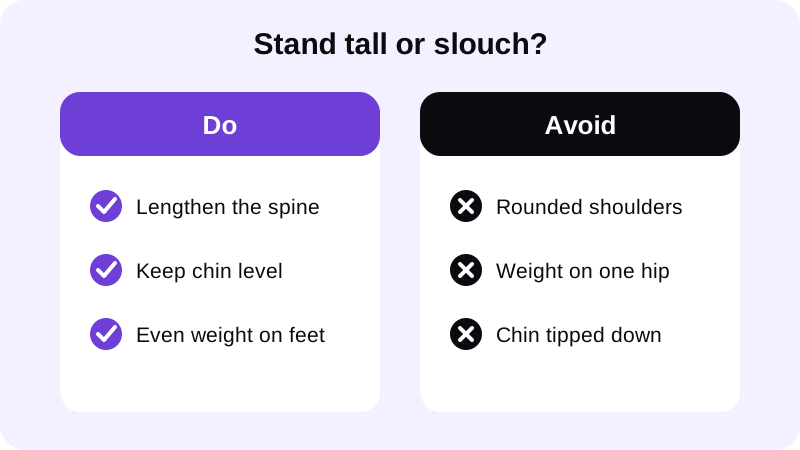
- Stand with feet roughly shoulder-width apart and weight spread evenly between them, not shifted onto one hip.
- Lengthen through the spine as if a string is pulling the crown of your head upward, without tilting the chin.
- Pull the shoulders back and down, away from the ears, so the chest opens instead of rounding forward.
- Level the chin — not up, not down — so the neck looks natural rather than stretched or compressed.
- Angle the body slightly rather than facing the camera dead-on; a quarter turn reads as longer than a flat-on stance.
These posing tips for height in photos work together. Skip any one of them and the others have less to work with, which is why a tall stance looks different from a slouched one even in the exact same spot.
Where should the camera sit to make you look taller?
Camera angle to look taller matters as much as posture. A camera held slightly below eye level and tilted up a touch elongates the legs and torso in the frame; a camera held above eye level does the opposite and visibly shortens the body.
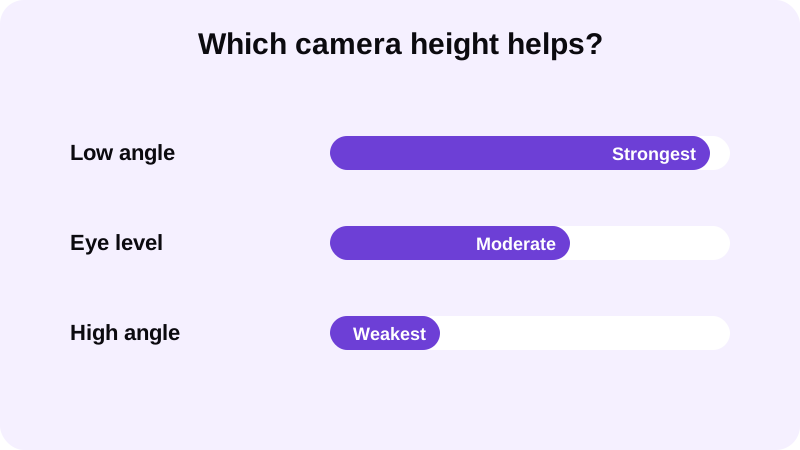
If someone else is shooting the photo, ask them to crouch or hold the phone a little lower than usual rather than snapping from standing height looking down. If you're shooting a mirror selfie, the same rule applies: a phone held a bit lower than your face reads taller than one held above it.
Framing matters too. Don't crop tight at the ankles — leave a sliver of space below the feet and above the head so the body has room to read as a full, unbroken line. A full-length shot with the whole body in frame generally reads taller than a three-quarter crop. For more on setting up that kind of shot, see how to take a full body photo that looks sharp.
Does posture fix itself, or do you have to work at it in the photo?
Standing posture for a height photo isn't something you can fake after the fact with an app — it has to happen in the stance itself. Shoulders that are already rounded in the source photo will still look rounded no matter how the image is edited afterward.
That's the same principle covered in how to fix posture in a photo: the pose comes first, the edit comes second. If you're shooting a selfie rather than having someone else take the photo, the arm's-length angle changes things again — how to improve posture in a selfie covers the adjustments specific to that setup.
Can editing make you look taller in a photo?
Once the pose and camera angle are right, Chisel's Height slider can stretch the whole photo vertically from its centre and trim the top and bottom edges, adding visible height to a shot that's already well posed. It doesn't lengthen the legs on their own — it stretches the full frame evenly, so it works best as a finishing touch rather than a fix for a slouched stance.
Like every slider in Chisel, Height has a natural limit marked in green. Push past it and the stretch starts to look obviously distorted — faces get long, doorways bend, and the photo stops looking like a normal shot. Staying inside that limit keeps the result believable.
Chisel's manual tools, including the Height slider, run on your phone and require no account. If you want the full picture of how the app's sliders and optional AI Transform work together, Chisel AI: what it is and how it works walks through the whole toolset.
What else affects how tall you look in a photo?
Background and clothing lines play a quiet role too. Vertical lines near the body — a doorframe, a rack post, a seam in a wall — tend to emphasize height, while strong horizontal lines near the waist or ankles can visually cut the body short. Positioning yourself near a vertical element in the background, rather than a horizontal one, gives the whole frame a taller feel.
Clothing does something similar. A plain top without a bold horizontal stripe at the waist, or shoes in a similar tone to the trouser or short hem, keeps the eye reading one continuous line from head to foot instead of breaking the body into visual segments.
None of this requires special equipment — it's a matter of where you stand relative to the background and where the camera sits relative to you. Get those two things right, and the stance and camera angle covered above do the rest of the work.
FAQ
Does standing up straight actually make you look taller in a photo?
Yes. A rounded upper back and a dropped chin compress the torso in the frame, which reads as shorter. Lengthening the spine, levelling the chin, and pulling the shoulders back opens up the torso and adds visible height without changing anything else about the shot.
What camera angle makes you look taller in a photo?
A camera positioned slightly below eye level, pointed up a touch, elongates the body and legs in the frame. A camera held above eye level does the opposite — it compresses the body and makes the subject look shorter, so keep the phone at or below eye level.
Does Chisel's Height slider make you taller in a photo?
It stretches the whole photo vertically from its centre and trims the top and bottom edges, which can add visible height to an already well-posed shot. It doesn't lengthen the legs on their own, and it stops at a natural limit so the result still looks like a real photo.
What's the biggest posing mistake that makes someone look shorter?
Shooting from above and cropping tight at the ankles. Both habits cut off visual length. Shoot from a lower angle, leave some space below the feet in the frame, and keep the stance tall rather than relying on the edit alone.