How to Take a Full Body Photo That Looks Sharp
Quick answer
The key to how to take a full body photo is distance, height and light: back up until your whole body fits with space to spare, hold the camera at chest height, and use a timer or tripod.
Key takeaways
- Stand back enough to fit your whole body with space above your head and below your feet
- Keep the camera at chest height, not above or below, to avoid distorting proportions
- Use a timer or tripod so you're not holding the phone in the shot
- Even, front-facing light shows your shape better than harsh side light
- Edit afterward with natural-limit sliders instead of over-posing for the camera
Here's how to take a full body photo that actually shows your shape: back up far enough to fit your whole body in frame with space above your head and below your feet, hold the camera at chest height, and use a timer or tripod instead of holding the phone yourself.
What's the easiest way to set up a full body photo?
Most full body photos fail before the shutter even clicks, because the setup is off — too close, too low, or held in a shaky hand. Fix the setup first and the rest of the photo takes care of itself.
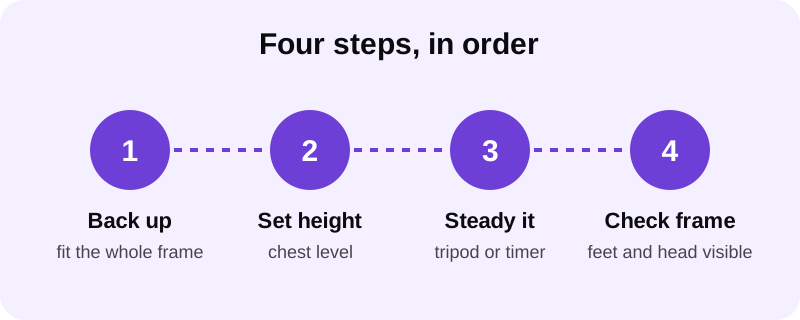
Where should the camera sit — distance, height and angle?
These three settings do more to make a full body photo look right than anything you do with your pose. Get them wrong and no amount of posing fixes the result.
- Stand far enough from the camera that your whole body fits with a clear margin above your head and below your feet — a tight crop at either end is the most common full body photo mistake.
- Set the camera at chest height. Shooting from a low angle stretches your legs and shrinks your shoulders; shooting from above does the opposite and flattens your frame.
- Face the camera square-on or turn slightly to a three-quarter angle. A straight-on shot reads as honest and is easier to compare over time; a slight turn can show more shoulder width.
- Use the back camera with a timer or tripod rather than a front-facing selfie camera, which distorts faces and bodies up close.
- Take a few frames at slightly different distances and angles so you have options to pick from afterward.
It's worth repeating the frame check between every shot, not just at the end. Phones shift position when a timer counts down, and a slightly tilted tripod or a hand resting on a shelf can throw off the whole composition without you noticing until you review the shot later.
How should you light a full body photo?
Light decides whether the shape of your body is visible or lost in shadow. A full body shot needs more even coverage than a close-up portrait because light has to reach your whole frame, not just your face.
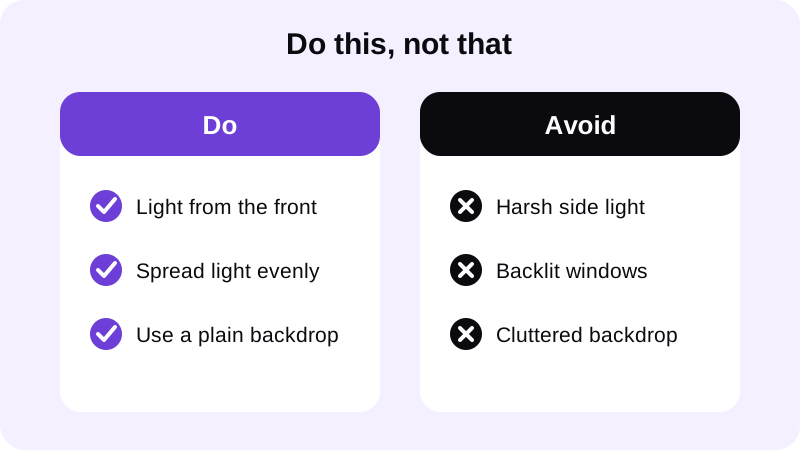
Front-facing, even light — daylight through a window or a single light source placed near the camera — shows definition clearly across your chest, arms and legs. Side lighting creates dramatic shadows on a close-up shot but tends to leave half a full body photo underlit. For a deeper breakdown of setups, see our guide on best lighting for gym progress photos.
Time of day matters more for a full body shot than people expect. Midday sun through a window tends to be harsh and directional, while an overcast afternoon or the light a couple of hours before sunset is softer and spreads more evenly across a standing subject. Indoors, a single lamp bounced off a light-colored wall or ceiling often works better than pointing it straight at yourself.
What pose and background make a full body photo look sharper?
A relaxed, upright stance with shoulders back and weight even on both feet reads far more naturally than a forced flex. For full body shots specifically, posture matters more than it does in a close crop, because the whole line of your body is visible at once — see our guide on how to fix posture in a photo for the specifics.
Keep the background simple. A plain wall, a gym mirror with minimal clutter, or an open floor all work better than a busy room, because clutter behind you competes with your body for attention. If you're shooting shirtless or in a fitted top, our guide on how to take a good shirtless photo covers angle and posing in more depth.
Clothing choice matters almost as much as pose for a full body shot. Fitted clothing or a shirtless photo both let the camera read your actual silhouette, while baggy shorts or an oversized hoodie hide the lines of your frame and make the whole photo harder to judge — and harder to edit cleanly afterward if you want to touch it up.
How do you edit a full body photo without it looking fake?
Once you have a clean, well-lit full body photo, small edits can sharpen it without changing who you are in the frame. Chisel is built specifically for this: it's an AI photo editor for men's gym and physique photos, not a general filter, and every slider shows a natural limit marked in green so the result still looks like you.
Because a full body shot shows your whole frame, proportion matters more here than in a close-up. Chisel's pose detection automatically finds your torso with no manual masking, which matters on a wider shot where a face-only tool would miss most of the photo. From there you can sharpen ab definition, add a touch of chest and shoulder volume to build a V-taper, or slightly widen the shoulders — all within the same natural-limit guardrails. Our body editor for men guide walks through the full process for gym photos generally.
All of Chisel's editing runs on-device, so your photo is never uploaded anywhere, and the app writes an AI-altered label into the photo's metadata so the edit stays disclosed. The core tools are free to use; Chisel Pro removes ads and the watermark and unlocks every tool, with a short free trial, or you can buy Chisel once as a Lifetime unlock instead of subscribing. It runs on iPhone and Android and requires no account to start editing.
When you're happy with the result, export at full resolution rather than relying on whatever compression your messaging app applies. Chisel can also export an animated before/after reveal, which is a simple way to share the original frame alongside the touched-up version without implying any claim about what your body will look like — it's just a side-by-side of the same photo, before the edit and after it.
Where else can you learn to edit a gym photo naturally?
FAQ
How far back should I stand for a full body photo?
Far enough that your whole body fits in frame with a visible gap above your head and below your feet. If your feet or the top of your head are cropped, back up more or switch to a wider lens if your phone has one.
What camera height is best for a full body photo?
Chest height, roughly level with your sternum. Shooting from below makes legs look longer and shoulders smaller; shooting from above shortens your frame and makes your head look larger than it is.
Should I use the front or back camera?
The back camera almost always gives a sharper, less distorted image than a front-facing selfie camera. Use a timer, a tripod, or prop the phone against something stable so you can use the back camera.
What should I wear for a full body gym photo?
Fitted clothing or a shirtless shot both work well because the shape of your torso reads clearly. Loose, baggy clothing hides your silhouette and makes the photo harder to edit cleanly afterward.
Can I edit a full body photo without it looking fake?
Yes, if you edit in proportion and stop at a believable point. Chisel's sliders mark a natural limit in green for each tool, so added definition or muscle still matches the rest of your frame.